


Creative Teams: Prove Workflow Automation in 10 Days
Start by automating the repetitive admin and intake tasks that steal creatives’ time. That single move delivers the fastest return on creative workflow automation, because it removes friction before you touch anything creative. Teams that automate routing, naming, and notifications first typically free up hours for actual creative work, cut approval delays, and reduce the back-and-forth handoffs that stall projects. Everything else, from tool selection to governance to AI pipelines, builds on that first win.
TL;DR:
- Automating routine tasks like file naming, routing, and notifications yields immediate time savings and reduces review cycles more effectively than focusing on AI features first.
- Identifying high-frequency, low-judgment tasks through time-sampling audits helps teams prioritize automations that generate measurable capacity for creative work.
- Implementing explicit workflow stages with designated owners and automated triggers ensures reliable automation and minimizes vague handoffs.
- Connecting core tools such as proofing, DAM, task management, and communication platforms through low-code integrations accelerates workflow efficiency at scale.
- Piloting small automation projects with clear success metrics and phased expansion boosts internal buy-in and prevents large-scale failures.
Table of Contents
- What Is Creative Workflow Automation?
- Six Quick Automation Wins and How to Measure Them
- How to Spot the Tasks Worth Automating First
- Design a Workflow That Automation Can Actually Trigger
- Build a Connected Toolbox Without Overengineering It
- What Actually Shortens Review and Approval Cycles?
- How Do You Keep Automated Output on Brand?
- How Agentic AI Changes Creative Production
- What to Look for in Creative Automation Tools
- The Rollout That Actually Works: Pilot, Measure, Iterate
- Where This Actually Goes From Here
- Scale Consistent Creative Output With InfluencerForge
- Sources
What Is Creative Workflow Automation?
Creative workflow automation means using software rules, templates, and connected tools to handle the repeatable steps in a creative project, so people spend their time on the work that actually requires judgment. It is not about replacing designers, writers, or video editors. It is about removing the file renaming, status chasing, and manual routing that surrounds their work.
The distinction matters because teams often try to automate the wrong layer first. They chase flashy AI features before fixing the mundane bottlenecks that actually eat the calendar. Aquent’s research on creative operations makes the case plainly: automating administrative tasks like file naming, status reporting, and review routing delivers immediate value and frees creative time faster than anything else on the list.
Six Quick Automation Wins and How to Measure Them
Before you touch anything complex, run through this list. Each item is small enough to build in a day and measurable enough to prove its worth within a month.
- Standardize intake with a templated form so every brief arrives with the same fields.
- Automate file naming and folder routing at upload, not after the fact.
- Set up auto-notifications when a deliverable is ready for review.
- Build proofing reminders that ping reviewers after a set number of hours.
- Automate version tagging so nobody works from an outdated file.
- Route approved assets to delivery and archive automatically.
Track three numbers: time saved per task, the drop in review rounds, and time-to-publish. Even a rough baseline, tracked over two weeks, makes the case obvious. Aquent’s guidance on creative operations notes that leaders who start small with easily measured automations build faster internal buy-in than those chasing bigger transformations.
Pro Tip: Pick one automation, run it for ten business days, and compare the before-and-after time spent on that single task. A small, clean number beats a big vague claim when you’re pitching leadership.
How to Spot the Tasks Worth Automating First
Not every repetitive task deserves automation right away. The ones worth fixing first are frequent, low-judgment, and currently costing real hours. Here’s how to find them.
- Run a one-week time-sampling audit. Ask each team member to log task categories in fifteen-minute blocks, or use whatever time tracker your task tool already has.
- Look for tasks that repeat more than ten times a week and take under fifteen minutes each. These are automation gold: high frequency, low complexity.
- Pilot the fix. Templated intake forms, automatic file naming and archiving, and auto-notifications when a deliverable is ready for review are usually the easiest wins because they touch every project.
- Calculate rough ROI: multiply hours saved per week by an internal hourly cost, or simply note how much creative capacity gets freed for higher-value work.
Dedicated task management platforms built for creative production, like Ftrack Studio’s creative task tools, give teams the task-level visibility to spot these patterns at scale, once you’re managing hundreds of tasks instead of a handful. Whatever you use, the principle holds: prove the win on one workflow before you expand.
Design a Workflow That Automation Can Actually Trigger
Automation only works reliably when the workflow underneath it is explicit. Vague handoffs produce vague automations. A tighter stage model gives every trigger something concrete to act on.
A workable structure looks like: intake, plan, produce, review, approve, deliver. Each stage needs an owner, not just a task list, and each transition needs a rule that fires automatically once conditions are met.
- Intake: a required-field form routes the brief to the right team lead based on project type.
- Plan: templates lock scope and timeline so downstream automation knows what “done” means.
- Produce: file naming conventions and folder structures apply automatically on upload.
- Review: once metadata checks pass (correct dimensions, file type, brand tags), the asset routes to the assigned reviewer.
- Approve: an approval trigger fires delivery and archiving in the same step.
Airtable’s research on creative workflow management points to the same conclusion: platforms that connect intake, review, approvals, and delivery let teams spend more time creating and less time on handoffs. Explicit ownership is what makes that connection possible.
Build a Connected Toolbox Without Overengineering It
Most teams default to whatever integration is easiest, then regret it at scale. The better approach matches the integration pattern to the actual size of the problem.
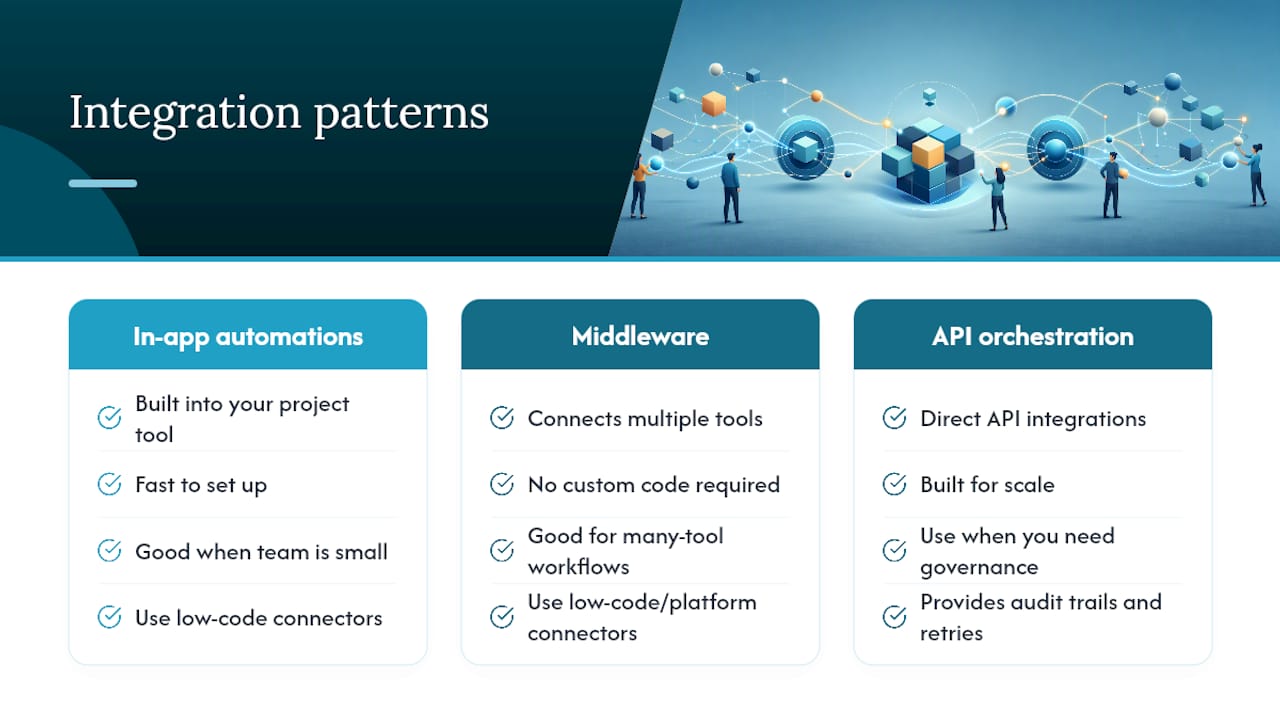
Three patterns cover most needs: in-app automations (built into your project tool, fast to set up), middleware platforms (connect multiple tools without custom code), and API-orchestrated flows (built for scale and tighter control). Choose low-code connectors when you’re moving fast and the team is small. Invest in direct API integrations once you need governance, audit trails, or volume that low-code platforms start to choke on.
Prioritize four connections above all others: proofing tools, your digital asset management system, your task tracker, and team communications. These four touch every project, so fixing them pays off fastest.
Before adopting any integration, check permissions models, whether it logs an audit trail, how it handles retries on failure, and what happens when an error occurs mid-workflow.
Pro Tip: A visual canvas that keeps the brief, moodboard, and plan in one view, the approach Storyflow takes to creative project management, reduces the context switching that breaks automations when tools don’t talk to each other cleanly.
What Actually Shortens Review and Approval Cycles?
Review bottlenecks kill more creative timelines than production delays do. Fixing them takes structure, not more meetings.
- Use structured comment forms instead of open-ended feedback threads, and limit final decision authority to two or three people per project.
- Set automated nudges that escalate after a set number of hours without a response, so no approval sits untouched over a weekend.
- Adopt version-aware proofing so reviewers see only what changed since the last round, not the whole asset again.
- Track time to first review, average number of rounds, and reviewer response time as your core metrics.
Teams that limit reviewers to actual decision-makers, rather than looping in everyone “for visibility,” typically cut rounds significantly, since fewer opinions in a thread means fewer conflicting notes to reconcile. Statistic to watch: if your average review cycle runs more than two rounds per asset, that’s usually a sign reviewers are debating direction rather than approving execution, a governance problem, not a tooling one.
How Do You Keep Automated Output on Brand?
Speed without guardrails produces fast, inconsistent output, which is worse than slow output in most brand contexts. Governance has to live inside the automation, not bolted on afterward as a manual check.
Build an approved-assets library and a set of brand tokens (colors, logos, typography rules, tone guidelines) that automated steps reference directly, rather than relying on someone remembering the rules.
- Store approved templates and reference assets in one governed library, not scattered folders.
- Run automated checks for rights metadata and watermarking before anything publishes.
- Add identity and visual-consistency safeguards so scaled output doesn’t drift from the source likeness or style.
- Log every automated approval so you can trace exactly what published and why.
Enterprise platforms are converging on this pattern. Adobe’s Firefly Creative Production treats governed templates and brand-control enforcement points as core infrastructure, not an add-on, because scaled creative output without embedded compliance checks becomes a liability the moment it reaches multiple markets.
How Agentic AI Changes Creative Production
Basic automation follows fixed rules: if X happens, do Y. Agentic workflows go further. An orchestration layer can interpret a brief, decide which model or tool to invoke, generate multiple options, and pause for human approval at defined checkpoints, rather than running one script in one direction.
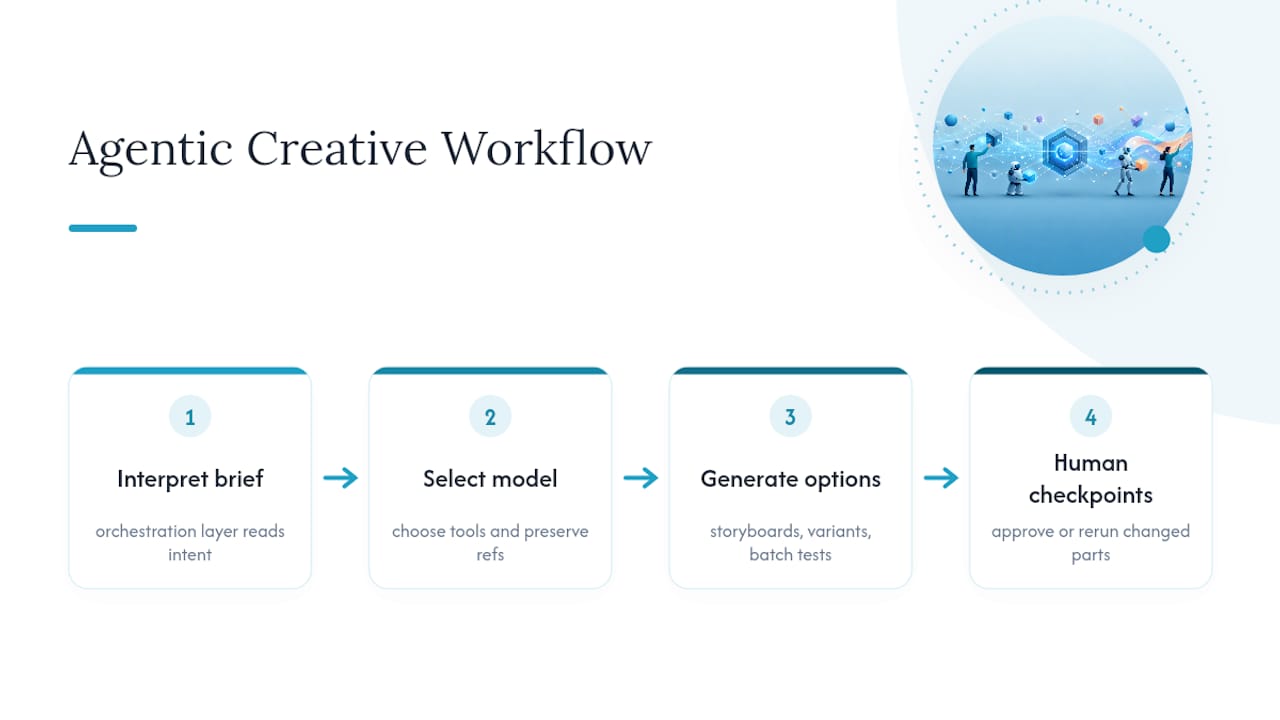
AWS’s work on agentic creative workflows describes pipelines that preserve references across steps and orchestrate several model calls in sequence, storyboard generation, then multi-shot variant production, then batch testing, all while keeping the same visual identity intact from one output to the next. Node-based canvases like ElevenLabs’ Flows apply a similar logic, letting teams re-run only the changed part of a pipeline instead of regenerating everything from scratch.
Identity consistency is the hardest part of this to automate well. On InfluencerForge.app, the Identity Lock feature, paired with model training and preset libraries, addresses exactly this problem: keeping a character’s appearance stable across many generated images and clips instead of drifting with each new variant.
Agentic orchestration works best where quality gates exist. Use agents to coordinate the pipeline, but keep a human reviewing the actual creative decision points, not just rubber-stamping the output at the end.
Governance and audit trails still matter here as much as anywhere else in the workflow.
What to Look for in Creative Automation Tools
Tools generally fall into a handful of categories, and knowing which job each one does best keeps you from buying overlapping software.
- Intake and task platforms centralize briefs and give visibility as volume grows into the hundreds or thousands of tasks.
- Proofing tools handle version comparison and structured feedback, cutting review rounds.
- Digital asset management (DAM) systems keep approved files, rights metadata, and brand assets in one governed place.
- Orchestration and middleware platforms connect the above into one flow without custom engineering.
- Agentic AI builders handle multi-step generative pipelines where identity and consistency need to hold across many outputs.
When evaluating any option, check for asset-awareness, real version control, integration depth, governance features, and a pricing model that matches your actual usage. One caution worth repeating: don’t automate subjective creative calls, like final tone or concept direction. Automation should clear the path to that decision, not make it for you.
The Rollout That Actually Works: Pilot, Measure, Iterate
Big-bang automation rollouts fail more often than they succeed, mostly because nobody proved the approach before scaling it. A staged rollout avoids that trap.
- Appoint an automation champion or a small taskforce, and get one leadership sponsor who can clear roadblocks.
- Scope a pilot to one workflow, run it for four to eight weeks, define two or three success metrics upfront, and set a clear rollback plan if it underperforms.
- Collect both hard numbers (time saved, rounds reduced) and qualitative feedback from the creatives actually using it day to day.
- Scale only once you see repeatable wins, governance controls in place, and efficiency gains you can point to with confidence.
Aquent’s research found that proof-of-concept pilots paired with grassroots engagement and a named champion materially reduce resistance to automation inside creative teams. Resistance usually traces back to unclear ownership, not the technology itself.
Pro Tip: Give your pilot a hard end date before you start. A pilot with no deadline quietly becomes permanent, whether or not it actually worked.
Where This Actually Goes From Here
Here’s my honest read on this, after digging through how these rollouts actually play out: most teams overthink the tooling and underthink the sequencing. The order matters more than the platform. Admin automation first, workflow structure second, governance third, agentic AI last, once the foundation can support it.
If I were prioritizing a calendar, month one is the pilot on a single workflow. Month two extends the automations that proved out and kills the ones that didn’t. Month three is when governance gets codified into templates and checkpoints rather than living in someone’s head.
The identity drift problem in scaled AI generation is real, and it’s the part most teams discover the hard way, after they’ve already generated fifty inconsistent variants of the same “character.”
— Tim
Scale Consistent Creative Output With InfluencerForge
Once your workflow can reliably route, review, and approve assets, the bottleneck usually shifts to production volume, especially for teams generating UGC-style content or influencer-driven ads across multiple campaigns. This platform generates social visuals, ads, and motion clips from a trained model, with features that help keep the same character recognizable across every image and clip instead of drifting from one output to the next.
Marketing teams and agencies producing high volumes of influencer-style content benefit from preset libraries and locked identity features that help maintain consistency across automated steps. If your pipeline already handles intake and review, the next logical step is plugging in generation that keeps pace with it. Start with the AI UGC ad generator to see how quickly a batch of on-brand variants comes together.
Sources
- The Automation Revolution: Efficiency in the Creative Process | Aquent
- Build agentic creative workflows with Amazon Quick and fal | Artificial Intelligence
- Creative workflow management: Steps & software | Airtable
- Creative project management | Storyflow