


6 Steps for TikTok AI Ads: Identity Consistent UGC and C2PA

Platform tools and AI vendors can now produce TikTok-ready video ads without a camera, a set, or a single hired actor. The direct next step is to build 2 to 4 AI-generated creatives, run them through a manual sandbox test before Smart+ or any agentic workflow touches them, and confirm your assets carry the required AI labels and consent documentation before you spend a dollar.
TL;DR:
- Use a manual sandbox test for at least 3 to 5 days, running identical creative variants to identify the most stable and effective assets.
- Ensure all AI-generated ads include proper AI disclosures, consent documentation, and abide by TikTok’s safety and copyright rules to avoid takedowns or legal issues.
- Leverage third-party tools for script generation, localized voiceovers, and identity-consistent UGC, but standardize aspect ratios and caption formatting to prevent rejection.
- Build a strong data foundation with Stripe pixel and offline conversions before relying on Smart+ automation, as unstable signals lead to poor optimization.
- Train AI models on at least 8 to 12 reference images for consistent influencer-like UGC and compare its performance against platform-native options before scaling.
Table of Contents
- What TikTok AI Ads Look Like Right Now
- How Do You Create TikTok Ads With AI Step by Step?
- How Do You Optimize AI Campaigns Without Losing Control?
- What Are TikTok’s AI Labeling and Safety Rules?
- When Does an AI UGC Platform Make Sense for TikTok?
- Which Third-Party AI Tools Work Alongside TikTok Ads?
- What Compliance Rules Apply to AI-Generated TikTok Ads?
- How Do You Troubleshoot Common TikTok AI Ad Generation Problems?
- Do TikTok AI Ad Case Studies Show Real Results?
- How Does AI Improve TikTok Ad Targeting and Segmentation?
- The Real Shift Isn’t Faster Ads. It’s Connected Systems
- Get Identity-Consistent AI UGC Without the Reshoot Cycle
- Sources
What TikTok AI Ads Look Like Right Now
TikTok has built out a genuine creative stack, not a single button. Generate with AI sits inside Ads Manager and turns a product URL, product ID, or manual copy input into finished video and image assets, then auto-selects multiple creatives for you to review. That’s the fastest entry point for e-commerce advertisers who just need working ads today.
Above that sits Symphony, TikTok’s broader creative studio, and the newer Symphony Agent, announced at Cannes Lions 2026. Symphony Agent is an agentic layer, meaning it doesn’t just generate one asset. It coordinates creative generation, creator discovery, and brief-writing across Creative Studio, Content Suite, and TikTok One, and it’s powered by Seedance 2.0 video generation.
Here’s how the effort maps to output:
- Minutes to output: Creative Studio templates and Content Suite’s AI Search, good for fast avatar videos, voiceovers, and translate-and-dub localization.
- Hours to output: Generate with AI in Ads Manager, working directly from a product feed.
- Days to output: Symphony Agent workflows that chain multiple asset types together.
- Days to weeks: TikTok One creator briefs and custom creator networks, when you need a human face and real production.
Start with the fastest tier. Move up only when the faster tier stops converting.
How Do You Create TikTok Ads With AI Step by Step?
Building a usable tiktok ai ads workflow comes down to sequencing, not tool selection. Here’s the order that keeps you from wasting render credits on assets nobody will approve.
- Gather inputs first. You need a product URL, 3 to 6 clean product shots, one or two core hooks (the opening line that stops the scroll), a defined call to action, and basic audience signals like age range or interest category.
- Pick your generator path. Use Ads Manager’s Generate with AI when you’re working straight from a product catalog. Use a dedicated AI UGC platform when you need identity-consistent characters or a specific creator style across multiple videos.
- Generate the script and visuals. Feed your hook into the tool, select a template or UGC persona, and let it render a first draft.
- Edit for pacing. Trim dead air in the first three seconds, add burned-in captions (TikTok viewers watch with sound off far more than marketers assume), and check the audio track for platform-native music or licensed voiceover.
- Run compliance QA. Confirm the ad doesn’t imply an endorsement it didn’t get, check brand guideline fit, and verify any AI disclosure requirements are met.
- Export and tag. Match TikTok’s required aspect ratio (vertical 9:16 for in-feed), decide whether captions are burned in or delivered as a separate file, and confirm commercial-use licensing on any AI-generated likeness before upload.
Pro Tip: Render two versions of every hook, one with a human-style UGC delivery and one with a straight product demo voiceover. TikTok’s algorithm rewards format diversity in testing, and you’ll often find the “boring” demo outperforms the flashier one.
How Do You Optimize AI Campaigns Without Losing Control?
Smart+ is TikTok’s automated campaign framework, and it works best when you feed it proven creative rather than raw guesses. Turning it loose on untested assets tends to backfire because Smart+ shows a documented first-mover asset bias: it leans hard into whichever creative gets early signal, even if that creative isn’t actually your best performer. AGrowth’s operational analysis recommends proving winners before promotion, not after.
The fix is a manual sandbox. Run several creatives in identical, manually controlled ad groups for several days before you let any AI-driven module touch them. Only the creative that holds up under equal, unbiased spend graduates to Smart+.
Once you’ve got a proven asset, apply these guardrails:
- Use Modular Control selectively rather than handing Smart+ every lever at once.
- Scale budgets in modest increments rather than doubling spend overnight.
- Duplicate winning campaigns for horizontal scaling instead of pushing one campaign’s budget past its stable range.
- Sync your Pixel and Conversions API, feed offline conversion events when you have them, and exclude recent buyers so Smart+ isn’t chasing people who already converted.
Smart+ can genuinely improve cost per acquisition when signals are strong, but Digiday’s coverage of TikTok’s AI-driven ad push notes that result depends entirely on having enough conversion volume for the system to learn from. Thin data in, unstable optimization out.
What Are TikTok’s AI Labeling and Safety Rules?
TikTok runs C2PA Content Credentials alongside invisible watermark detection and standard moderation filters to catch AI-generated or manipulated media before it reaches feeds, according to Symphony’s product documentation. These systems exist because the risk is real, not theoretical.
In 2026, reporting from the Straits Times documented TikTok ads running unauthorized AI clones of public figures, including Dewy Choo and Zhang Linghe, to target audiences in Singapore. The consequence was swift moderation action and a reminder that unlicensed likeness use isn’t a gray area. It’s a takedown risk and a brand liability.
Build these controls into your workflow before you launch anything:
- Get signed consent for any real person’s likeness, whether it’s a creator, employee, or licensed talent.
- Use identity-lock features on your generation platform so a model’s appearance stays consistent instead of drifting between renders.
- Add clear AI disclosures wherever the platform or your market requires them.
- Keep audit metadata, meaning the prompt history, consent records, and source files, so you can prove provenance if a claim gets challenged.
Pro Tip: Store your consent documentation with the render itself, not in a separate folder someone will forget to check. A missing consent form found after a campaign is live costs far more than the five minutes it takes to file it up front.
When Does an AI UGC Platform Make Sense for TikTok?
Platform-native tools handle volume well, but they’re not built to keep one character looking like the same person across 20 different video hooks. That’s a specific problem, and it’s where a dedicated AI UGC platform earns its place in the stack.
InfluencerForge addresses that gap with identity lock, which keeps a trained model’s face and features stable across contexts instead of drifting from clip to clip. That matters most when you’re running a recognizable “creator” across a full TikTok campaign rather than a one-off ad. The platform also offers fast model training, preset libraries built around common UGC formats, and image-to-video conversion, which lets you go from a still product shot to a moving hook without a reshoot.
A reasonable first test: train a small model on 8 to 12 reference images, generate three distinct UGC-style hooks from it, then run all three through the manual sandbox workflow described earlier. You’ll know within a week whether the identity-consistent approach outperforms your platform-generated baseline.
- Start with the guide to running an AI influencer on TikTok for a fuller walkthrough of model setup.
- Review AI-generated UGC ads that actually convert for format ideas before your first render.
Which Third-Party AI Tools Work Alongside TikTok Ads?
TikTok’s native tools handle generation and delivery, but most serious advertisers stitch in outside software for the pieces TikTok doesn’t own: script ideation, voice cloning for localized dubs, and identity-consistent character generation for repeatable UGC. None of these require special API access. You generate the asset externally, then upload it to Ads Manager the same way you’d upload any other file.
The practical integration points fall into three categories. Script and hook generation tools help you produce variations faster than a single copywriter can, which matters because TikTok’s ad format rewards testing many hooks against a small number of proven visuals. Voice and dubbing tools solve the localization problem for advertisers running the same creative across multiple language markets, since re-shooting for each region isn’t realistic at TikTok’s ad cadence. Identity-consistent generation platforms fill the UGC gap, producing a recognizable “creator” persona across dozens of assets without booking a real person for every shoot.
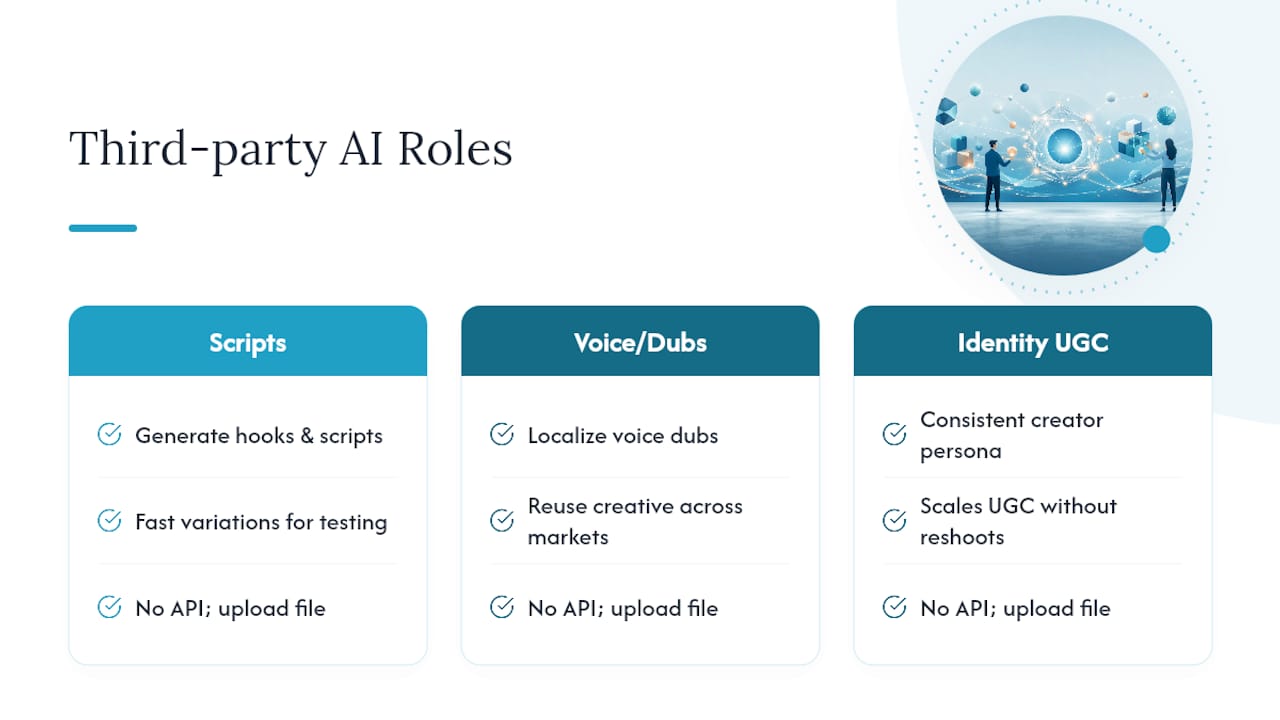
The integration friction shows up in file handling, not connectivity. Aspect ratio mismatches are the most common failure. TikTok in-feed ads expect vertical 9:16 video, and an asset exported at 16:9 or 1:1 from a third-party tool will either get rejected in review or display poorly in feed. Caption formatting is the second common snag. Some external tools burn captions directly into the video file, others export a separate subtitle file, and Ads Manager doesn’t reconcile the two automatically. Decide on one approach and standardize it across your entire creative pipeline, so your editors and QA reviewers aren’t guessing on every upload.
What Compliance Rules Apply to AI-Generated TikTok Ads?
General platform advertising policy covers things like prohibited products and misleading claims. AI-generated content adds two additional risk categories that a lot of advertisers miss: copyright exposure and data privacy.
Copyright risk shows up when a generation tool trains on or reproduces copyrighted material, whether that’s a music track, a piece of stock footage, or a recognizable visual style. If your AI tool’s licensing terms don’t explicitly grant commercial-use rights for advertising, you’re exposed even if the platform never flags the ad. Read the commercial license section of any generation tool before you use its output in paid media, not after a legal notice arrives.
Data privacy risk comes from the input side. If you’re training a custom model or generating a likeness using someone’s photos, whether an employee, a customer, or a licensed creator, you need documented consent that covers advertising use specifically, not just general content creation. Some regions treat biometric data, including facial likeness used to train an AI model, as a protected category with its own consent requirements separate from general data protection rules. Check your local requirements before assuming a general release form covers AI training.
The practical safeguard is the same one that protects you against the identity-clone risk covered earlier: keep signed consent on file, preserve your prompt and source-image history, and treat AI content the same way you’d treat any licensed asset. TikTok’s own AI content labeling guidance is worth a read before you scale a campaign that leans heavily on synthetic faces or voices.
How Do You Troubleshoot Common TikTok AI Ad Generation Problems?
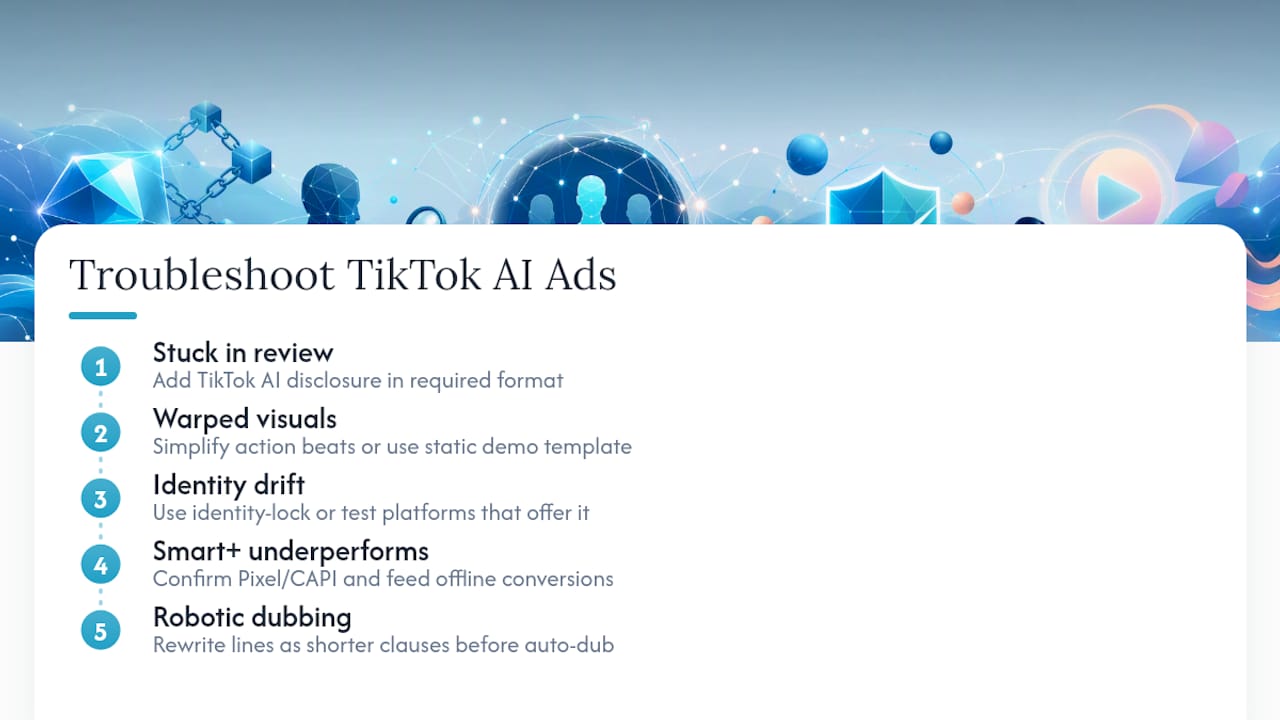
Most AI ad generation failures on TikTok trace back to a handful of repeat offenders, and knowing the pattern saves you a lot of wasted renders.
The ad gets stuck in review or rejected outright. This is almost always a labeling or disclosure gap. Check whether your creative needs an explicit AI-generated content disclosure and whether you’ve added it in the format TikTok’s policy requires, not just a caption mention.
The generated video looks off, warped hands, inconsistent lighting, an unnatural voice cadence. Most platform-native generators still struggle with complex hand movement and fast-motion sequences. Simplify the script’s action beats or switch to a static product-demo template rather than a dynamic one for that particular hook.
The AI-generated creator’s face changes between renders. This is an identity-drift problem, common with tools that don’t lock a model’s features across generations. It’s the exact issue identity-lock features are built to solve, and it’s worth testing a platform that offers it if you’re running the same persona across multiple assets.
Smart+ underperforms right out of the gate. Check your conversion signal volume first. Smart+ needs enough qualified events to optimize against, and thin data produces unstable results regardless of how good the creative is. Feed offline conversions if you have them, and don’t graduate a campaign to Smart+ before your Pixel and CAPI setup is confirmed clean.
Translated or dubbed audio sounds robotic. Most auto-dub tools handle short punchy lines better than long explanatory sentences. Rewrite your script for shorter clauses before you run it through translation.
Do TikTok AI Ad Case Studies Show Real Results?
Publicly documented TikTok AI ad performance data is still thin compared to the platform’s overall ad volume, and most detailed campaign numbers advertisers cite come from agency case studies rather than TikTok’s own disclosures. What’s consistently reported, rather than a specific isolated metric, is the pattern: advertisers who prove creative in a manual sandbox before scaling into Smart+ report more stable cost per acquisition than those who hand untested assets straight to automation.
The operational lesson matters more than any single number. AGrowth’s analysis of Smart+ behavior points to a specific tactic worth adopting directly: run identical creative in parallel, manually controlled ad groups for 3 to 5 days, let the data settle, then promote only the stable winner into an AI-optimized module. Advertisers skipping that step tend to get burned by first-mover asset bias, where Smart+ commits budget to whichever creative gets early signal rather than whichever creative actually converts best over time.
If you want a framework for judging your own results rather than someone else’s headline number, track three things across your sandbox period: hook-level watch-through rate in the first three seconds, cost per initiate-checkout (not just cost per click), and how your winning creative’s performance holds up once it moves from manual control into Smart+. A creative that performs well manually but collapses under automation usually signals a signal-hygiene problem, not a creative problem. Fix your Pixel and CAPI sync before you blame the ad.
How Does AI Improve TikTok Ad Targeting and Segmentation?
TikTok’s targeting engine leans on behavioral and interest signals gathered from in-app activity, and AI’s real contribution here isn’t creating new audience categories. It’s compressing the testing timeline needed to find which existing segments respond to which creative.
Manual audience-building means guessing at interest categories and waiting days for enough data to know if the guess was right. AI-assisted targeting, particularly inside Smart+ and its audience expansion features, tests creative against broader signal pools faster and reallocates spend toward responding segments in near real time. The tradeoff, covered earlier, is that this only works well once you’ve fed the system enough conversion data to learn from.
The practical improvement for e-commerce and DTC advertisers shows up in lookalike refinement. Instead of building a single lookalike audience from your customer list and hoping it holds, AI-driven targeting can differentiate between customers who converted from different creative types and weight the audience accordingly. That’s a meaningful upgrade over static segmentation, but it depends entirely on clean signal input: a properly synced Pixel, CAPI events firing correctly, and offline conversion data feeding back into the system when available. Skip that groundwork and AI targeting optimizes against noise instead of real buyer behavior.
The Real Shift Isn’t Faster Ads. It’s Connected Systems
The interesting change happening in TikTok advertising isn’t that AI makes creative faster, though it does. It’s that tools like Symphony Agent are starting to connect creative generation directly to performance data, which means the brief-writing, the asset selection, and the optimization loop are converging into one system instead of three separate jobs.
That shift changes what you should be testing for. Prioritize orchestration and signal quality over chasing the fastest render time. A campaign fed by a clean Pixel and honest conversion data will outperform one running flashier creative on messy signals, every time. Keep real creators and employee advocates in your mix where trust genuinely matters to the purchase decision, and reserve fully synthetic UGC for rapid direct-response testing where speed matters more than a documented human behind the camera, with clear disclosures either way. Watch how labeling and watermark requirements evolve over the next few quarters. Treat all of this as a phased experiment, not a platform migration you do once and forget.
— Tim
Get Identity-Consistent AI UGC Without the Reshoot Cycle
Everything in this guide, the sandbox testing, the identity-consistency problem, the scaling discipline, comes down to one bottleneck: producing enough proven creative fast enough to feed TikTok’s AI systems properly. This platform closes that gap directly by allowing the training of one model to generate dozens of consistent UGC-style variations, aiming to avoid booking talent for every new hook or dealing with a generated face drifting between renders.
If you’re ready to test this against your current creative pipeline, start small. Follow the guide to training your first AI model and run one persona through 8 to 12 reference images. Then put that output through the AI UGC ad generator and run it through the same manual sandbox test described earlier in this guide. Compare it directly against your platform-generated baseline and let the sandbox data, not a hunch, decide which one earns your next ad budget.
Sources
- About Generate with AI in TikTok Ads Manager
- TikTok Symphony Agent: Cannes 2026 Creative AI Guide
- TikTok ads use AI clones of popular figures Dewy Choo, Zhang Linghe to target S’poreans
- Agrowth